Dashboard
The Dashboard is your home page. It answers the three questions that start every day: who's arriving, who's leaving, and what needs my attention?

The focus banner
Right under the header, a lightbulb banner highlights the single most useful thing to know right now, for example:
- "{N} arriving guests have outstanding balances totalling £{X}"
- "{N} guests arriving today have no pitch assigned"
- "Occupancy averaging {N}% next 7 days — consider a promotion"
- "Bookings up {N}% vs last year — {N} bookings worth £{X} this month"
- "All on track. {N} arrivals today, occupancy at {N}%"
Headline cards
Three clickable cards show today's numbers:
- Arrivals — guests arriving today
- Departures — guests leaving today
- Occupancy — what percentage of your park is occupied (or "No data" if you haven't set allocation for today)
Click a card for the detail dialog — Today's Arrivals, Today's Departures or On Site Today — where you can check guests in and out without leaving the page. Arrivals and Departures also have a View all shortcut that opens the Bookings page pre-filtered.
Action Required
This card lists what actually needs doing, in priority order:
- Outstanding balances — guests who owe money, with quick action buttons
- Arrivals not checked in — with a Check In button per guest
- Arrivals with no pitch assigned — with an Assign Pitch button that takes you to the Pitch Map
- Days with no allocation set — with a Set Allocation shortcut to Allocation & Pricing
Checking a guest in from here celebrates with a little creature flying across your screen — and, more importantly, moves the guest to "Checked in".
Occupancy — Next 14 Days
A bar chart of your park's occupancy for the coming fortnight:
- Teal bars show healthy occupancy; darker means busier
- Red bars flag days with no allocation set — those days can't be booked at all, so fix them first
- Hover a bar for the date, occupancy percentage and units booked
- Click a bar to see the guests staying that night, grouped by accommodation type, with a capacity chip per group
If no allocation exists at all, the chart prompts you to set it up on the Allocation page.
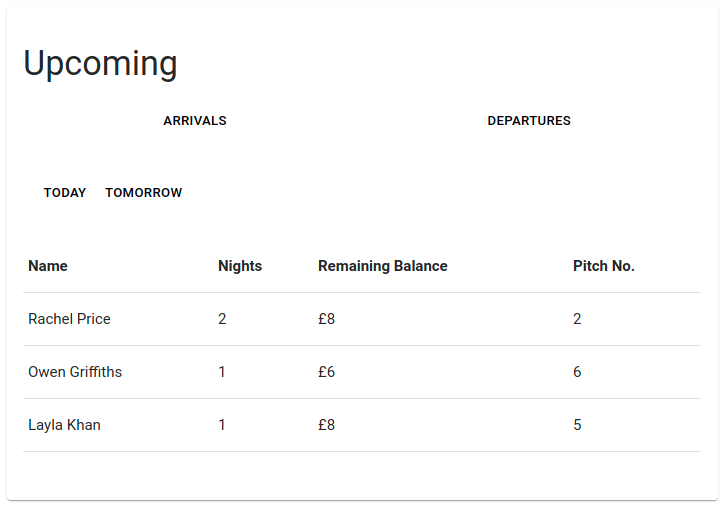
Upcoming
Your next two days of Arrivals and Departures (tabs: Today / Tomorrow), with each guest's nights, Remaining Balance and pitch — so you can spot money to collect on arrival.
This month at a glance
Four stat cards summarise the month so far:
- Revenue MTD
- Bookings MTD
- Avg Booking Value
- YoY Change — green when you're up, red when you're down
Performance
Your month-to-date chart with Bookings / Revenue / Arrivals metrics and a This Month / YoY toggle. The headline states the movement plainly — for example "+23% increase (+4 Bookings)" — or "Insufficient data" if there's no last-year baseline to compare against.

Click any point on the chart to see the individual bookings behind that day — handy when a bar looks surprising.
A morning with the Dashboard
- Read the morning notifications — arrivals, departures, overdue payments.
- Open the Dashboard; work through Action Required top to bottom: chase balances, assign pitches, check guests in.
- Glance at the 14-day occupancy chart for gaps worth promoting — or red days needing allocation.
- Check Performance to see how the month is tracking versus last year.